Digital Service Menus built for real-world Fixed Ops performance
More consistent recommendations. Higher approval. Better accountability.
A mobile-friendly way to present maintenance and repair recommendations with clarity, consistency, and accountability — helping advisors spend less time explaining and more time earning approvals.
Trusted by dealerships, private-label partners, and Fixed Ops teams nationwide since 1984.
What is a Digital Service Menu?
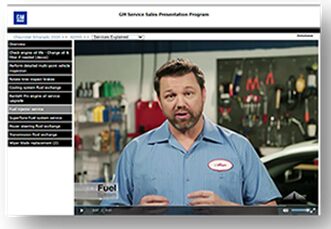
A Digital Service Menu provides a consistent, customer-friendly way to present maintenance and repair recommendations — with clear descriptions, benefits, and pricing.
Instead of handwritten notes or rushed explanations, it creates a repeatable experience customers can understand — quickly and confidently.
When service recommendations are presented clearly and consistently, the impact shows up fast.

Higher approval rates
Customers say yes more often when recommendations are clear, visual, and professionally presented.

More consistent advisor performance
Your best advisor shouldn’t be the only one who can present value. A menu raises the floor for the entire team.

Less time explaining… more time selling
Built-in talking points and media reduce repetitive explanations and decision fatigue.

Clear tracking and accountability
See what was presented, what was accepted or declined, and where opportunities are leaking out of the process.
A tool that supports the service process… not a replacement for it
Most service departments don’t have a “menu problem” — they have a consistency problem.
Here’s where the Digital Service Menu supports execution inside a proven service process.
The menu supports execution at the moments that matter most.
7-Step List
- Customer Contact & Appointment Flow
- Pre-Visit Preparation
- Check-In & Walk-Around
- Maintenance Communication
- Inspection Results
- Delivery & Next Visit Setup
- Follow-Up & Retention
When the process is clear, the menu makes execution easier and more consistent.
What’s included
Everything advisors need to present services clearly and consistently
… without sounding scripted.

Mobile-friendly menu presentations (in-store or remote)

Advisor-friendly talking points for each recommendation

Short explainer media (Video or AI Avatar as appropriate per menu item)

Recommended services by mileage/interval (completely customizable)

Presentation history and customer responses tracked
Reporting to spot missed opportunities and training gaps
Everything that we do is customized and configured to match your store’s pricing, packages and preferred workflow.
Built for real-world Fixed Ops performance
-
Proven in dealerships for decades… not built as a generic software template
-
Designed to support advisor flow, not slow it down
-
Backed by training and implementation support when needed
Services sell themselves
“My advisors don’t have to sit there and explain for 10 minutes…it sells itself.”
Customers understand…and say yes more often
“The biggest advantage is that the customer sees what they’re getting…it’s an easier sell.”
Immediate business impact
“We saw a meaningful increase in profitability within the first couple of weeks!”
No-Questions-Asked Money-Back Guarantee
Try the Digital Service Menu in your operation.
If it’s not a fit, we refund the program fee.
No long-term contracts. No fine print.
FAQ
No. The Digital Service Menu does not require DMS integration.
It lays on top of your existing DMS and service workflow as a presentation and communication layer. Advisors use the menu to explain recommended services, show value, and guide customer decisions. Once services are approved, the advisor completes the repair order in the DMS exactly as they do today.
This approach avoids IT delays, DMS permission and security concerns, and unnecessary workflow disruption — resulting in faster setup, higher advisor adoption, and quicker results.
Yes. Present in-store, send by text/email, or share remotely when it fits your workflow.
It really depends on what your goals are…in all cases it’s up to you. Many stores start by improving consistency in the steps they already do… and expand from there.
Our core database already gives you the manufacturers maintenance recommendations back to the year 2000 as a starting point. You can easily adjust and edit from there including dealership recommendations and al-a-carte services with our online editor… all depending on how you want your service presentation structured.
You’ll be able to get started right away…same day that you decide to go ahead and give it try. Typical pricing setup is very straightforward and quick via our online editor, and assisted with your dedicated Menu Support Manager.
Yes… from quick-start advisor guidance to more structured service process training, depending on what you want to accomplish.
Want to see a Digital Service Menu built around your dealership and service process?
We’ll show you what it looks like, how advisors use it, and where it fits into a practical service process — without making it feel complicated.